Wednesday, March 13, 2013

Invalid Credential when Add to Existing Deployment - Part III

In my previous post, I talked about encountering the same Failed to create new Authentication Context: null error even though I have followed the instruction to change to "adminconsoleservice" login.


org.apache.jasper.JasperException: An exception occurred processing JSP page /getServerInfo.jsp at line 76 

73: 
74: AuthContext lc = new AuthContext("/"); 
75: //AZLABS lc.login(); 
76: lc.login(AuthContext.IndexType.SERVICE, "adminconsoleservice"); 
77: while (lc.hasMoreRequirements()) { 
78: Callback[] callbacks = lc.getRequirements(); 
79: ArrayList missing = new ArrayList(); 


So, I spent some time yesterday to investigate why.


First, I started by manually testing via the UI using .../openam/UI/Login?service=adminconsoleservice.

Bingo!

It's very obvious why the Authentication Context is null. The administrative account "amadmin" is used during configuration, thus by showing a Active Directory Authentication module, the "amadmin" user is never ever going to be able to login.


So, this has to be fixed. 

With the same URL .../openam/UI/Login?service=adminconsoleservice, the following UI has to be shown in order for the amended code to work.


However, I do not know what has gone wrong with the initial configuration at first. It took me quite a while to discover. It has got to do with how the Organization and Administrator Authentication configurations are arranged.


In fact, I have not made any change to it. It comes by default.


What I have changed, however, is the ldapService in Authentication Chaining.

I have toggled the default DataStore instance to AZAD instance. This is to allow all users to authenticate via Microsoft Active Directory by default. For administrator, he/she has to manually append the module=DataStore to the URL - .../openam/UI/Login?module=DataStore.


I found out that this is the root cause!

What's the workaround?

Step 1: Create a new Authentication service - azService.


Step 2: Choose AZAD as the default instance.


Step 3: Toggle back to DataStore instance for Authentication service - ldapService.


Step 4: Now, this is the important step. Change Organization Authentication Configuration from ldapService to azService.


Test accessing the URL .../openam/UI/Login?service=adminconsoleservice again. Now the UI is what I am expecting!


And of course, the OpenAM Configurator wizard is no longer complaining now. Happy!


.


Monday, March 11, 2013

Invalid Credential when Add to Existing Deployment - Part II

With the release of OpenAM 10.1 Xpress, I was keen to find out whether or not a previous issue I encountered while configuring a 2nd instance of OpenAM via the wizard has been solved.


Too bad.. not resolved yet. In fact, as pointed out, there is a bugster raised for this issue. (See here for more info)

Sad thing is when I go to the Tomcat webapp for OpenAM 10.1-Xpress, the source code in getServerInfo.jsp has not been modified at all.

The catalina.out showed the following trace stack:

org.apache.jasper.JasperException: An exception occurred processing JSP page /getServerInfo.jsp at line 75 72: } 

73: 
74: AuthContext lc = new AuthContext("/"); 
75: lc.login(); 
76: while (lc.hasMoreRequirements()) { 
77: Callback[] callbacks = lc.getRequirements(); 
78: ArrayList missing = new ArrayList(); 

Stacktrace: at org.apache.jasper.servlet.JspServletWrapper.handleJspException(JspServletWrapper.java:568) at org.apache.jasper.servlet.JspServletWrapper.service(JspServletWrapper.java:455) at org.apache.jasper.servlet.JspServlet.serviceJspFile(JspServlet.java:390) at org.apache.jasper.servlet.JspServlet.service(JspServlet.java:334) at javax.servlet.http.HttpServlet.service(HttpServlet.java:728) at org.apache.catalina.core.ApplicationFilterChain.internalDoFilter(ApplicationFilterChain.java:305) at org.apache.catalina.core.ApplicationFilterChain.doFilter(ApplicationFilterChain.java:210) at org.forgerock.openam.validation.ResponseValidationFilter.doFilter(ResponseValidationFilter.java:44) at org.apache.catalina.core.ApplicationFilterChain.internalDoFilter(ApplicationFilterChain.java:243) at org.apache.catalina.core.ApplicationFilterChain.doFilter(ApplicationFilterChain.java:210) at com.sun.identity.setup.AMSetupFilter.doFilter(AMSetupFilter.java:99) at org.apache.catalina.core.ApplicationFilterChain.internalDoFilter(ApplicationFilterChain.java:243) at org.apache.catalina.core.ApplicationFilterChain.doFilter(ApplicationFilterChain.java:210) at org.apache.catalina.core.StandardWrapperValve.invoke(StandardWrapperValve.java:222) at org.apache.catalina.core.StandardContextValve.invoke(StandardContextValve.java:123) at org.apache.catalina.authenticator.AuthenticatorBase.invoke(AuthenticatorBase.java:472) at org.apache.catalina.core.StandardHostValve.invoke(StandardHostValve.java:171) at org.apache.catalina.valves.ErrorReportValve.invoke(ErrorReportValve.java:99) at org.apache.catalina.valves.AccessLogValve.invoke(AccessLogValve.java:936) at org.apache.catalina.core.StandardEngineValve.invoke(StandardEngineValve.java:118) at org.apache.catalina.connector.CoyoteAdapter.service(CoyoteAdapter.java:407) at org.apache.coyote.http11.AbstractHttp11Processor.process(AbstractHttp11Processor.java:1004) at org.apache.coyote.AbstractProtocol$AbstractConnectionHandler.process(AbstractProtocol.java:589) at org.apache.tomcat.util.net.AprEndpoint$SocketWithOptionsProcessor.run(AprEndpoint.java:1780) at java.util.concurrent.ThreadPoolExecutor$Worker.runTask(ThreadPoolExecutor.java:886) at java.util.concurrent.ThreadPoolExecutor$Worker.run(ThreadPoolExecutor.java:908) at java.lang.Thread.run(Thread.java:662) Caused by: javax.servlet.ServletException: com.sun.identity.authentication.spi.AuthLoginException: Failed to create new Authentication Context: null


I took a look at the Fisheye and discovered the fix. So I went ahead to change the source code in getServerInfo.jsp.


No luck also.

org.apache.jasper.JasperException: An exception occurred processing JSP page /getServerInfo.jsp at line 76 

73: 
74: AuthContext lc = new AuthContext("/"); 
75: //AZLABS lc.login(); 
76: lc.login(AuthContext.IndexType.SERVICE, "adminconsoleservice"); 
77: while (lc.hasMoreRequirements()) { 
78: Callback[] callbacks = lc.getRequirements(); 
79: ArrayList missing = new ArrayList(); 

 Stacktrace: at org.apache.jasper.servlet.JspServletWrapper.handleJspException(JspServletWrapper.java:568) at org.apache.jasper.servlet.JspServletWrapper.service(JspServletWrapper.java:455) at org.apache.jasper.servlet.JspServlet.serviceJspFile(JspServlet.java:390) at org.apache.jasper.servlet.JspServlet.service(JspServlet.java:334) at javax.servlet.http.HttpServlet.service(HttpServlet.java:728) at org.apache.catalina.core.ApplicationFilterChain.internalDoFilter(ApplicationFilterChain.java:305) at org.apache.catalina.core.ApplicationFilterChain.doFilter(ApplicationFilterChain.java:210) at org.forgerock.openam.validation.ResponseValidationFilter.doFilter(ResponseValidationFilter.java:44) at org.apache.catalina.core.ApplicationFilterChain.internalDoFilter(ApplicationFilterChain.java:243) at org.apache.catalina.core.ApplicationFilterChain.doFilter(ApplicationFilterChain.java:210) at com.sun.identity.setup.AMSetupFilter.doFilter(AMSetupFilter.java:99) at org.apache.catalina.core.ApplicationFilterChain.internalDoFilter(ApplicationFilterChain.java:243) at org.apache.catalina.core.ApplicationFilterChain.doFilter(ApplicationFilterChain.java:210) at org.apache.catalina.core.StandardWrapperValve.invoke(StandardWrapperValve.java:222) at org.apache.catalina.core.StandardContextValve.invoke(StandardContextValve.java:123) at org.apache.catalina.authenticator.AuthenticatorBase.invoke(AuthenticatorBase.java:472) at org.apache.catalina.core.StandardHostValve.invoke(StandardHostValve.java:171) at org.apache.catalina.valves.ErrorReportValve.invoke(ErrorReportValve.java:99) at org.apache.catalina.valves.AccessLogValve.invoke(AccessLogValve.java:936) at org.apache.catalina.core.StandardEngineValve.invoke(StandardEngineValve.java:118) at org.apache.catalina.connector.CoyoteAdapter.service(CoyoteAdapter.java:407) at org.apache.coyote.http11.AbstractHttp11Processor.process(AbstractHttp11Processor.java:1004) at org.apache.coyote.AbstractProtocol$AbstractConnectionHandler.process(AbstractProtocol.java:589) at org.apache.tomcat.util.net.AprEndpoint$SocketWithOptionsProcessor.run(AprEndpoint.java:1780) at java.util.concurrent.ThreadPoolExecutor$Worker.runTask(ThreadPoolExecutor.java:886) at java.util.concurrent.ThreadPoolExecutor$Worker.run(ThreadPoolExecutor.java:908) at java.lang.Thread.run(Thread.java:662) Caused by: javax.servlet.ServletException: com.sun.identity.authentication.spi.AuthLoginException: Failed to create new Authentication Context: null


Hopefully I have some time to play with the source code tomorrow.


.

Saturday, March 9, 2013

Cross Domain Single Sign On - What's it?

The concept of why a cookie created specifically for a particular domain cannot be accessed by another domain has been explained repeatedly year over year.

A lot of articles tried to explain, but in words, which can get a little complicating. (ok, maybe to me :>)

The following diagram explains it all. (yes, OpenSSO articles is still the to-go place for reading-up concepts)


Clear and precise. Why talk so much when a simple diagram can do the job? (maybe technical writers just like to write, but doesn't like to draw)


To introduce CDSSO, each SSO product implement its proprietary mechanism to support single sign-on across multiple domains. 


OpenAM / OpenSSO introduced Cross-Domain Controller Servlet (CDCServlet) to handle CDSSO.


SiteMinder introduced Cookie Provider to handle the same scenario.


.

Friday, March 8, 2013

OpenAM HMAC-based One Time Password

There are many Authentication modules available out-of-the-box from ForgeRock OpenAM. One of them is HOTP - HMAC-based One Time Password.

Fairly easy to configure and integrate with the default LDAP module. So, the user will be first prompted with a user name and password fields to key in. Once successful, he/she will be redirect to the HOTP page to key in the OTP.


The previous implementation of HOTP in OpenAM was a little cumbersome such that user has to manually click on "Send OTP" button in order to fire the sending of the OTP to the user's email and/or SMS.


This feature has been enhanced in the latest release of OpenAM 10.1. (I'm not too sure of 10.0.1, but I'm pretty sure 9.5.x doesn't have this feature). The latest enhancement is to "Auto Send OTP Code".

Simple enhancement, yet it makes the user experience so much better!

.

Wednesday, March 6, 2013

Federation: Redirect POST vs POST Artifact

I attended an Identity course last week and Federation was covered (of course).


We covered Redirect-POST and POST-Artifact and made some comparison.

Well, whenever I need diagrams on Federation, I always go to PingIdentity. Their document is tip-top - my #1! So, here's the link ...


I should say Redirect-POST is the most commonly deployed.


Most activities revolves around redirection via the user's browser. Easily achievable.


When it comes to POST-Artifact, the problem lies in the highlighted red box.


Usually, when different organizations choose Federation for integration, they would most likely not like to expose their backend identity infrastructure as much as possible. However, POST-Artifact requires the Federation Servers in the SP side and the IdP side to communicate to each other.

Adoption rate will be definitely low, as one can easily predicate. 


.


Tuesday, March 5, 2013

Fix for the famous Configuration Options page

I just saw a new fix for OpenAM (OPENAM-2230 - Users should not be redirected to config/options.htm if OpenAM has already been configured but the config store is unavailable).

This fix is to resolve the famous Configuration Options page which I have blogged about here and here some time back.


And the solution is exactly what I have suggested way back in 2011!


Stay tuned, the fix will be incorporated in the next release of OpenAM - 10.2!

Cool!

.


Monday, March 4, 2013

Cross Domain Single Sign-On

In an environment where there are multiple domains and single sign-on across the domains is required, CDSSO (Cross Domain SSO) shall be utilized. This is a good article to kick-start.


When using CA SiteMinder, the same can be achieved via Cookie Provider. The concept is pretty similar to that in OpenAM.


OpenAM uses iPlanetDirectoryPro as its cookie name; SiteMinder uses SMSession.

.


Wednesday, February 27, 2013

OpenAM 10.1 Session Failover Mechanism Part II

I talked more about the new Session Failover mechanism in OpenAM 10.1 in my previous blog. The use of  Open Message Queue and Berkeley DB Java Edition has been dropped in favor of the embedded OpenDJ that ships with each OpenAM release.


So how does it work with the embedded OpenDJ?

A new ou is created - ou=tokens. Whenever a user logs in and a session is created, an entry will be created in the OpenDJ under ou=famrecords,ou=openam-session,ou=tokens,dc=xxx,dc=xx.


And if you have multi instances of OpenAM, the multi-master replication (MMR) in the embedded OpenDJ kicks in to take care of session replication from nodes to nodes.

As simple as that. Neat!

.


Tuesday, February 26, 2013

OpenAM 10.1 Session Failover Mechanism

In my previous blog, I mentioned that there is a new implementation of the Session Failover in OpenAM 10.1.


This new implementation is important to me as all my customers are using Session Failover in their production environment. So I need to evaluate it in order to advise them.

Well, if one install OpenAM 10.1 via the GUI (i seldom use GUI though), this is how easy one can turn on Session Failover. You just need to check on "Enable Session HA Persistence and Failover". Yes, that's it!


Now, let's assume session failover is not enabled during installation and configuration, it is equally easy to turn on Session Failover post-configuration.


Navigate to Configuration > Global > Session. Click on New.


Do nothing. Click on Add.


That's it? Yes, that's it!


Gone are the days when one has to install AMSFO utilities which include the Open Message Queue and Berkeley DB Java Edition. And then to instruct OpenAM to store user sessions into the appropriate message queue via the Database Url. 


The bad news for Systems Integrator is that we have lesser man-days to quote for professional services. *sigh* Thanks to OpenAM 10.1!

.


Monday, February 25, 2013

OpenAM 10.1.0 Release Notes

It's great news that OpenAM 10.1.0 Xpress has been released late last week.


With this new release, the session failover mechanism has been changed. It used to be utilizing Open Message Queue and Berkeley DB Java Edition.

The current implementation makes use of the embedded OpenDJ server to store user sessions. The best thing about it is this implementation can be used to make sessions persist across restart for single OpenAM servers.

However, do take note: "When session failover is configured to use external OpenDJ directory servers, OpenAM must access those directory servers through an LDAP load balancer that can fail over connections from OpenAM whenever a directory server goes offline. Otherwise, sessions could continue to persist after users logout of OpenAM."


There are 2 other limitations which I think worth mentioning.

1. Do not run different versions of OpenAM together in the same OpenAM site.

==> This has not been possible before. But I really hope it can happen in the future. This will make migration really easy. Just a wish, no harm wishing. :)


2. Not all features of OpenAM work with IPv6.

==> IPv6 is pretty hot these days and the IT governing body in Singapore has even dictated that all software be compliant with IPv6 in all the ministries. This makes life difficult for Systems Integrators like us. If a software does not fully support IPv6, what can we do? It takes time for all software (especially matured software) to slowly conform to IPv6.

.


Saturday, February 16, 2013

Friday, February 15, 2013

OpenAM Lineage

I have told customers multi-times - OpenAM is not a new product, even though ForgeRock is only 2. In fact, OpenAM is around 13 years old now. The history of OpenAM dates back to early 2000 when Sun Microsystems started this as a Directory Server Access Management Edition (DSAME).


Interestingly, after Oracle took over Sun OpenSSO, the product was "chopped" into several non-compatiable products - each sold differently :).


.

Thursday, February 14, 2013

ForgeRock Open Source Advantage

The following slide sums up what my customers have been asking for the past 1-2 years regarding ForgeRock Open Source Advantage.


Great job!

.

ForgeRock Global Partner Network

Azimuth Labs is in ForgeRock Global Partner Network!


.

Monday, February 4, 2013

Architecture Definition

It is always hard to balance between the Problem space and Solution space when architecting solutions for customers. 


An art indeed.

.

Invalid Credential when Add to Existing Deployment - Part II

Last week, I posted this - Invalid Credential when Add to Existing Deployment where I attempted to install and configure a 2nd instance of OpenAM server via the Configuration Wizard UI.

Not successful if the default ldapService is not switched to DataStore.


Out of curiosity, I install a 3rd instance of OpenAM server in our test labs. However, I choose to configure via SSO Configurator Tool this time round.

Went through smoothly like a breeze!


[azlabs@idp config]$ java -jar configurator.jar -f am3config
Checking configuration directory /home/azlabs/var/am3....Success.
Installing OpenAM configuration store...Success RSA/ECB/OAEPWithSHA1AndMGF1Padding.
Extracting OpenDJ, please wait...Complete
Running OpenDJ setupSetup command: --cli --adminConnectorPort 7888 --baseDN dc=azlabs,dc=sg --rootUserDN cn=Directory Manager --ldapPort 52389 --skipPortCheck --rootUserPassword xxxxxxx --jmxPort 3689 --no-prompt --configFile /home/azlabs/var/am3/opends/config/config.ldif --doNotStart --hostname am3.azlabs.sg %0AOpenDJ+2.4.5%0APlease+wait+while+the+setup+program+initializes...%0A%0ASee+%2Fhome%2Fazlabs%2Fopt%2Ftomcat-7.0.34-am3%2Ftemp%2Fopends-setup-6235062839150188850.log+for+a+detailed+log+of+this+operation.%0A%0AConfiguring+Directory+Server+.....+Done.%0A%0ATo+see+basic+server+configuration+status+and+configuration+you+can+launch+%2Fhome%2Fazlabs%2Fvar%2Fam3%2Fopends%2Fbin%2Fstatus%0A...Success.
...Success
Installing OpenAM configuration store in /home/azlabs/var/am3/opends...Success.
:
:
:

...Success.
Reinitializing system properties....Done
Configuring server instance....Done
Setting up monitoring authentication file.
Configuration complete!


Strange indeed.


.

Friday, February 1, 2013

OpenIDM Architecture

A picture says a thousand words.


Honestly, it's still not ready for today's enterprises after talking to customers. But we shall see in a year or 2... I'm optimistic about this product! :)

.

Thursday, January 31, 2013

Invalid Credential when Add to Existing Deployment

I wanted to conduct a mini-POC for my customer with a dual instance of OpenAM servers. However, we have only 1 OpenAM server running in our labs. So, I went ahead to install the 2nd instance.

No good! Keep hitting "Unauthorised - Invalid Credentials" error...


How can that be? I was very sure I keyed in the correct credential of the 1st OpenAM in Step 1.


It was only after a while then I found out the cause. Our 1st OpenAM was already configured to authenticate with Microsoft AD by default.


The installer, by default, needs to communicate with OpenAM via the DataStore instance. So, we need to temporarily switch the AZAD instance back to DataStore.


And once the installer goes through, switch back to AZAD again will do the trick!


.


Monday, January 14, 2013

OpenAM High-Availability with Security

There are many types of customers. But there is 1 common characteristic in them - save cost! :)

When OpenAM servers are to be deployed in Production, high-availability is required most of the time (in fact, all of the time for my customers). So this implies more machines and thus more money!

And so, usually when High-Availability is concerned, 2 boxes are more than what they can commit.


But, it is not a good practise to deploy the Administrative Console facing the Internet. I would recommend the following architecture, always. 


This architecture strips off the administrative capability of the 2 Internet-facing OpenAM servers. To save cost, the OpenAM server with Administrative Console can be deployed in on of the boxes. 

It's not resource intensive since how many administrators can you have in a corporate? It can also be shut down when not in use. No excuse please.


.


Saturday, January 12, 2013

Open Identity Stack

What is an Open Identity Stack? A simple diagram says it all.


Want to know more? Go to ForgeRock website by clicking here.

.


Sunday, January 6, 2013

Common Boot-up Issue

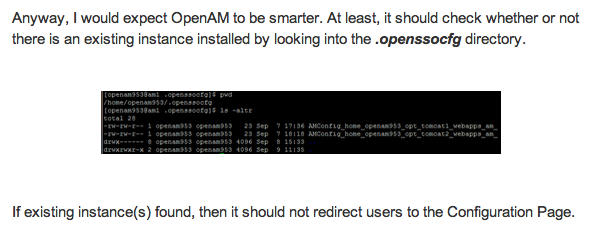
It is fairly common to hear OpenAM administrators complaining of reaching the Configuration Options page after a restart of OpenAM server, even though they are pretty sure OpenAM was previously successfully configured.


Well, sometimes, I still do hit the same irritating page! Just like today. :) What happened?


A look at the web container's log (in my case, Tomcat 7) will reveal why:


INFO: Initiating Jersey application, version 'Jersey: 1.1.1-ea-SNAPSHOT 07/13/2009 07:22 AM'
checkConfigProperties :com.sun.identity.setup.ConfiguratorException: /home/azlabs/.openssocfg/AMConfig_home_azlabs_opt_am1_webapps_openam_ (No such file or directory)


A history of what I have executed in the shell prompt also confirm what's the real cause:


[azlabs@idp ~]$ history


  902  opt/am1/bin/shutdown.sh
  904  opt/am1/bin/startup.sh
  907  cat .openssocfg/AMConfig_home_azlabs_opt_tomcat-7.0.34-am1_webapps_openam_
  910  opt/am1/bin/shutdown.sh
  911  /home/azlabs/opt/tomcat-7.0.34-am1/bin/startup.sh
 

When OpenAM was initially configured, the Tomcat was started up via "opt/tomcat-7.0.34-am1/...". The symbolic link "am1" (which points to tomcat-7.0.34-am1) was later created.

As such, if Tomcat is now started via "opt/am1/...", it will attempt to look for a file "AMConfig_home_azlabs_opt_am1_webapps_openam_" in the .openssocfg directory (which obviously will fail since there is no such file).

And so, the famous "Configuration Options" page will appear.


.

Monday, December 17, 2012

Removed Functionality in OpenAM 10.0.1

OpenAM 10.0.1 was released late last week. This is not OpenAM 10.1 Xpress, do not be confused. :)


With this release, the following functionalities are removed:

1. OpenAM 10.0.1 does not include the amtune command.

2. OpenAM console only mode is no longer supported. Console only mode is likely to be replaced with a different solution in a future release.

3. The Test Beta Console has been removed. Its functionality is currently available through the ssoadm command.

4. OpenAM no longer includes the SafeWord and Unix authentication modules.


Will they be missed? No. :)


.

Friday, December 14, 2012

Oracle Mobile and Social Access Management

Sometimes it's good to look around what others are doing in the market. It helps, really.

So, what's the hype these days? Cloud, Mobile, Social. You can't run away from these 3 themes.


Today, I came across Oracle Mobile and Social Access Management.


We should chop it into 2 components:

  • Mobile Access Management; and
  • Social Access Management

Social Access Management is nothing but OAuth and OpenID authentication. OMSS (Oracle Mobile and Social Server) now supports Google, Yahoo, Facebook, Twitter, or LinkedIn. (so besides OAuth 2.0, it does support OAuth 1.0)

Mobile Access Management is something like a ESSO on a mobile platform.


Yes, I know traditional WSSO people will be very much against developing something that is beyond web. But, hey, what are the 3 current themes these days?  Cloud, Mobile, Social.

If we are going to survive, we should adopt the trend and not stay away from it.

Yes, it's troublesome to develop a SDK for iOS and yet another SDK for Android. But this is what customers want. Who are the potential customers?

I can foresee big insurance companies wanting to adopt this solution for their multiple mobile applications for insurance agents who are always on the mobile. These applications would need to be single-sign-on so as to save the agents's time while serving customers.

I can also foresee big banks waiting to adopt this solution for their mobile applications for the private bankers who are also always on the move.

These are big customers who do not need features rich Single Sign-On solutions, but specific needs to their critical and money-making applications for their mobile employees. And not forgetting, these are good willing paying customers. :)

.


Sunday, December 9, 2012

HTTPOnly Cookies in OpenAM Policy Agent 3.0.5

Good news out there! With OpenAM Policy Agent 3.0.5, one can configure OpenAM to transmit only HTTPOnly cookies to the browsers (Read here).


HTTPOnly Cookies (Not yet in OpenAM console) 
As of version 3.0.5, web policy agents with this property set to true mark cookies as HTTPOnly, to prevent scripts and third-party programs from accessing the cookies. Property: com.sun.identity.cookie.httponly


We know the security teams in customers' sites are super paranoid about cookies. Yes, cookies that stay in users' browsers and can be hijacked easily!

More about HTTPOnly Cookies here. Note from Wikipedia - This restriction mitigates but does not eliminate the threat of session cookie theft. 

Better than not doing anything, right?


.