Thursday, May 7, 2015

Data Store, LDAP User Attributes and Subjects

In my previous blog Global Session vs User Session, I mentioned how to go about configuring Session settings on a per-user basis. 

First, go to the Subjects tab and search for the User.


Then, we set a different Session setting for the user. In this example, we change the Maximum Idle Time for this user from the default 30 minutes to 60 minutes.


Fairly simple from UI perspective, but what really happens behind the scene?


There is a need to map Maximum Idle Time from the UI to an attribute in the user's LDAP entry. In this case, OpenAM makes use of an attribute iplanet-am-session-max-idle-time.


So that means OpenAM needs to be able to edit the user's LDAP entry. (see the other blog of mine) More importantly, the backend Data Stores (e.g. LDAP) must have the necessary attributes defined in the schema. (e.g. iplanet-am-session-max-caching-time, iplanet-am-session-max-idle-time, iplanet-am-session-max-session-time, iplanet-am-session-quota-limit)


In Data Stores, click on the appropriate backend. 


Scroll to the section LDAP User Attributes. Ensure that the necessary attributes are defined. 


Embedded OpenDJ
If the backend is an embedded OpenDJ that is installed together with OpenAM, then we are fairly sure the OpenDJ schema is populated with the required session attributes. The schema is defined in ...//opends/config/schema/99-user.ldif .

External OpenDJ
If the backend is an external OpenDJ, we need to ensure the external OpenDJ is chosen during OpenAM installation. The installation will ensure the appropriate attributes are created in 99-user.ldif.

If the external OpenDJ is configured post OpenAM installation, then we need to ensure 99-user.ldif from the embedded OpenDJ is copied to the the external OpenDJ. One can choose to load the schema manually with pre-defined ldif files in ...//ldif/opendj/.


The above 2 scenarios are quite straight-forward. What if the backend is Microsoft Active Directory or any of the supported user data stores?


Remember we said earlier that we need to load the necessary attributes into the OpenDJ schema? The same has to be done on any other User Data Stores. 

Well, this becomes tricky. 

Will the AD administrator allow non-AD related attributes to be created on the AD? Likely not. This is not a technical issue, but an operational one.


.

Wednesday, May 6, 2015

Global Session vs User Session

We all know there is a Session tab in OpenAM Administration console listing all the current sessions in a particular OpenAM node. In the Session table, there are 2 columns "Max Session Time" and "Max Idle Time".


We all know that the Session for every user can be configured globally in Configuration ++ Global +++ Session.


Click on Session and scroll all the way down to Dynamic Attributes section. This is where Global Session is configured.


Is it possible to configure a different Maximum Session Time and/or Maximum Idle Time on a per-user basis in OpenAM? 

The answer is yes, but we seldom do that as this is really a operational headache. Some customers of ours will instead opt for different Session setting on a per-department basis. This will be via some customized codes in Post Authentication Processing module and determined by a certain attribute (e.g. departmentCode) in the users' LDAP (or Microsoft AD) entry. 

Suppose a customer insists on having different Session setting on a per-user basis, the following is how we go about achieving that. 

1) Go to Subjects tab and search for the user


2) We can see that the Session service is currently not available for this particular user. This implies the values are inherited from Global Session setting which we discussed earlier.

3) Click on Add


4) Choose Session and click Next.


5) This is where different Session values can be set on a per-user basis. Click on Finish.


6) We are done.


Nice!

.

Tuesday, May 5, 2015

com.sun.identity.idm.IdRepoException: No plug-ins configured for this operation


In Data Store ++ Plug-in Configuration +++ LDAPv3 Plug-in Supported Types and Operations, the default settings for realm, user and group are grant-all operations.


In Production, it is a good practice to restrict the operations that are allowed for OpenAM to execute on the backend data store. e.g. OpenDJ or Microsoft Active Directory.

The rationale is simple. We only want OpenAM to consume data from the backend data stores. OpenAM shall not be used as an Identity Management tool.

For most of our deployment, we will remove create and delete operations. For one of our customers, edit operation is intentionally not removed as we have custom codes in Post Authentication Processing module that will update some attributes in users' LDAP entries.


Recently, we launched Facebook social login for this customer.


The following OAuth 2.0 Authentication Features is lifted from ForgeRock Wiki:

  1. The module offers the possibility to authenticate a user and map the account in different ways:
    1. Without any local identity in the OpenAM, however identifying the user by one of the attributes provided by the OAuth 2.0 provider
    2. Map the user to an "anonymous" account in the OpenAM
    3. Map the user to a local identity based on the attributes received from the OAuth 2.0 Provider
    4. Create an account on the fly on the OpenAM local user data store with the attributes received from the OAuth 2.0 Provider
  2. Global Logout as an option to also terminate the session with the OAuth 2.0 Provider
  3. Provide the access token and attributes obtained to trusted applications that use the OpenAM
  4. The Account Mapper, Attribute Mapper and Email gateway can be extended since they are implemented as plug-ins

So, during unit testing, we always hit into "com.sun.identity.idm.IdRepoException: No plug-ins configured for this operation" error during Step d.

We were initially lost, but eventually realised it was caused by the missing create operation in LDAPv3 Plug-in Supported Types and Operations.


Once the create operation is added, the Facebook account is now able to be created on the fly.


.

Monday, April 27, 2015

OpenDJ Replication Architecture

The way OpenDJ replicates data from one node to the other is slightly different from Sun/Orace Directory Server. OpenDJ utilizes Replication Servers for data replication as shown below:


I was reading OpenDJ Mailing List the other day and came across a great response from Chris Ridd:

The key difference in OpenDJ is that replication is not configured between pairs of servers like it often is in other products.

Instead, OpenDJ logically consists of a number of replication servers that are “fully meshed”, i.e. every replication server is connected to every other replication server. The replication servers hold the changelogs, but no LDAP data. OpenDJ also has directory servers that hold LDAP data that connect to replication servers in order to send and receive changes.

(You can configure an OpenDJ server to be a pure directory server (a DS) or a pure replication server (an RS) or both at the same time (DS+RS). The setup tool will create all of these combinations for you.)

When you use “dsreplication enable”, you are effectively adding a new node (--host1) to the existing fully meshed topology (--host2 can be any host in the topology). As Jean-Noël mentioned, the replication servers exchange views of the topology, so when you add a new replication server to the topology, it automatically becomes connected to every other replication server in the topology.


Good read!

Tuesday, April 21, 2015

OAuth2 Provider - ERROR: The authorization server can not authorize the resource owner

I helped to configure a basic OAuth2 Provider for a customer in their SSO infrastructure. In fact, I configured in 2 environment for the same customer. The first was configured months ago and worked like a charm. The second one was recently configured and we encountered errors during integration test with a OAuth2 Client.


During the integration testing, we were very sure the users key in the user name and password correctly. But right after successful user authentication, we always got the error - "ERROR: The authorization server can not authorize the resource owner".


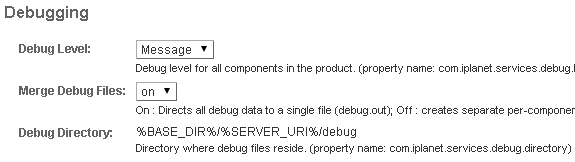
Why? Pretty hard to guess. So I switched the OpenAM debug log level from ERROR to MESSAGE.


Wow! The logs were many and each was huge and hard to debug. So I changed strategy. Besides setting the debug level to MESSAGE, I also ensured that the Merge Debug Files was switched to On.


Much better this time as the log was sequential and was telling a good story of what exactly happened that led to the error.


In OpenAM debug log, the following was shown right above the error message:
Entitlement:04/21/2015 12:14:57:224 PM SGT: Thread[ajp-apr-2443-exec-3,5,main]
[PolicyEval] PolicyEvaluator.evaluate
Entitlement:04/21/2015 12:14:57:224 PM SGT: Thread[ajp-apr-2443-exec-3,5,main]
[PolicyEval] search result: privilege=OAuth2ProviderPolicy
Entitlement:04/21/2015 12:14:57:224 PM SGT: Thread[ajp-apr-2443-exec-3,5,main]
[PolicyEval] Privilege.doesSubjectMatch: falseEntitlement:04/21/2015 12:14:57:224 PM SGT: Thread[ajp-apr-2443-exec-3,5,main]
[PolicyEval] Advices: {}


The PolicyEval happened right before the error message - "ERROR: The authorization server can not authorize the resource owner" was thrown.


Somehow, the Subjects "OAuth2ProviderSubject" in OAuth2ProviderPolicy policy was missing. After adding it back, the error was gone.


.

Friday, March 27, 2015

OpenAM Web Policy Agent Version

I was upgrading a few OpenAM Web Policy Agent to version 3.3.4 for a customer yesterday and found something which I have been always wanted to comment about.


In OpenSSOAgentBootstrap.properties, you'll see the following:

#------------------------------------------------------------------------------
# Web Agents Bootstrap File
#
# OpenAM Policy Agent
#
# Version: 3.0

####################################################


The same goes to OpenSSOAgentConfiguration.properties.


#------------------------------------------------------------------------------
# Web Agents Configuration Property File
#
# OpenAM Policy Agent
#
# Version: 3.0

####################################################


I would very much prefer it indicates the exact version from operational point of view. (The ones who implement/deploy a system usually are not the ones maintaining it)


#------------------------------------------------------------------------------
# Web Agents Bootstrap File
#
# OpenAM Policy Agent
#
# Version: 3.3.4

#####################################################


Yes, I know the policy agent version will be displayed in the amAgent debug log. But over time, it gets rotated.


2015-03-26 21:29:37.108       -1 12788:773c80 all: =======================================
2015-03-26 21:29:37.108       -1 12788:773c80 all: Version: 3.3.4
2015-03-26 21:29:37.108       -1 12788:773c80 all: Revision: 12082
2015-03-26 21:29:37.108       -1 12788:773c80 all: Build Date: Jan 15 2015 17:13:06
2015-03-26 21:29:37.108       -1 12788:773c80 all: Build Machine: constable.internal.forgerock.com
2015-03-26 21:29:37.108       -1 12788:773c80 all: =======================================
2015-03-26 21:29:37.117       -1 12788:773c80 all: naming_validator(): validation disabled


By the way, there are 2 new features introduced in OpenAM Policy Agent 3.3.4.


There are also some important changes in version 3.3.4.


The following 3 properties are introduced in OpenSSOAgentBootstrap.properties.

# Agent initialization related properties
#
# - init.retry.max:   maximum number of consecutive agent initialization retries. Default (not set) value is 0.
# - init.retry.wait:  wait time (value in seconds) between retries. Default (not set) value is 0.
# - nss.shutdown:     enables (value: on) or disables (value: off) Mozilla NSS/NSPR framework shutdown in the agent module.
#                     Set this property to off in case the agent is used together with other Web Server modules using NSS/NSPR.
#                     Default (not set) value is on.
#
# Hot-Swap Enabled: No
#
com.forgerock.agents.init.retry.max =
com.forgerock.agents.init.retry.wait =
# com.forgerock.agents.nss.shutdown = on


.

Thursday, March 26, 2015

OpenAM Security Patch

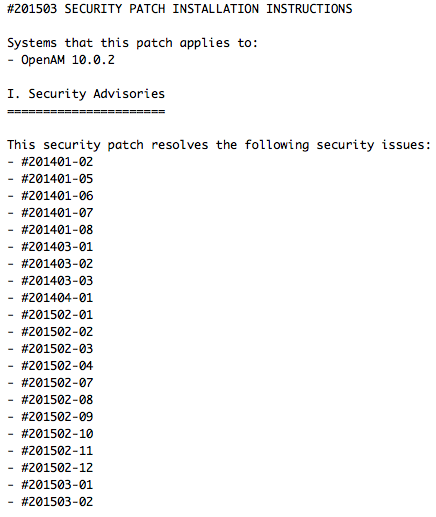
I am preparing myself before heading to my customer's site to help them patch their OpenAM 10.0.2 servers.


The past patches used to be standalone. So if there are 2 security advisories that introduced 3 patches, then one had to perform patch 3 times.

Today, I am seeing an accumulated patch released by ForgeRock for OpenAM.


So besides #201503-01 and #201503-02, it contains previous patches that were introduced some months back.

Is this a good move? Pretty convenient I would say because this particular customer has not applied #201502-* yet.

So this saves my time.


.

Thursday, March 19, 2015

Configuration Data Store Indexes for External OpenDJ

In production, the Configuration Data Store is usually an external OpenDJ server. In fact, most usually a pair of OpenDJ servers.


There is a section in OpenAM documentation - Preparing an External Configuration Data Store, which is useful . Read here.

The most important item is to set indexes on OpenDJ during configuration. See below:


In a recent deployment, I have forgotten to set the above indexes and the machine where OpenDJ servers were running on always hit 90-100% CPU. Very top-ish through the day.

After the indexes were set, the OpenDJ servers went back to normal.  Proper indexing does help.


.

Thursday, March 5, 2015

ForgeRock has set up APJ HQ in Singapore

Finally, it's official. ForgeRock announced that it has set up its Asia-Pacific Japan (APJ) regional headquarters in Singapore. Full press release here.


In fact, we have been working closely with Sumal & team since December 2014. Customers in the Asia region, especially those in Singapore, have been asking for ForgeRock's presence years ago. This has finally become a reality.

In addition, support engineers will also be stationed in Singapore to better serve customers in this region.

This is a great start to the year!


By the way, Singapore Press Holdings is Azimuth's customer. :)

.

Tuesday, February 3, 2015

OpenAM Policy Configuration - HA Issue

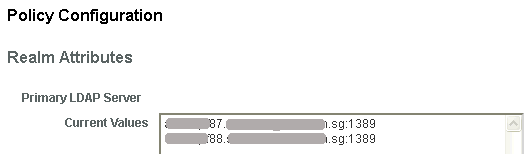
When attempting to configure Policy Configuration (Access Control > Realm > Services > Policy Configuration) for High-Availability,  only "Primary LDAP Server" is available.

Strange isn't it?

Nevertheless, based on quick memory of how HA is configured for Data Store (Access Control > Realm > Data Stores > Datastore), I added the secondary LDAP server hostname and port number into the 2nd line of Primary LDAP Server.


Bomb! OpenAM debug log complained of "failed to get LDAP server name. If you enter more than one server name in the policy config service's Primary LDAP Server field, please make sure the ldap server name is preceded with the local server name".


So the configurations allowed are:
1. All OpenAM nodes hit the same OpenDJ server (no load-balance; no HA)
2. Each OpenAM node to hit a dedicated OpenDJ server (load-balanced, but still no HA)


Should we have a LB in front of a set of OpenDJ servers, with MMR configured, and all OpenAM nodes shall hit the LB? Maybe that's the only workaround as of now.


By the way, I share the same pain as this bugster - Consistency for LDAP configuration across OpenAM.


.


Thursday, January 29, 2015

OpenAM Log Directory - Different School of Thought

There is a thread in OpenAM mailing list that discusses on how to re-configure the default log directory to a different directory.


With no offense to anyone, I have never find the need to change from the default setting in OpenAM via the Administration Console.

In most production environment, there is usually a dedicated filesystem partition for logging purpose. Our practice has always been to create a symbolic link from the default log directory to the dedicated filesystem partition - be it on Unix or Windows.

Nothing too difficult and easy to achieve. Why spend so much time trying to re-configure?

Different school of thought, maybe.

.

Wednesday, January 28, 2015

OpenAM Logging

If you have been debugging OpenAM a lot by looking through the debug logs set in MESSAGE level, you'll get "lost" at times as the logs can get very verbose.


Just saw this commit in OpenAM repository... 


Hopefully this enhancement helps!


.

Tuesday, January 27, 2015

OpenAM CTS Configuration Parameters - Root Suffix

Be careful if you use an external OpenDJ as the OpenAM CTS store.

The documentation has the following suggested root suffix.


It seems to suggest that root suffix for my deployment should look like "ou=openam-cts,o=xx.xx.sg". (RED arrow). However, during testing, I found out that sessions are created right under "ou=openam-cts,o=xx.xx.sg, and not the desired "ou=famrecords,ou=openam-session,ou=tokens,dc=openam-cts,o=xx.xx.sg".


The actual format for root suffix should be "ou=famrecords,ou=openam-session,ou=tokens,[your organization]".


This will create the OpenAM sessions nicely under ou=famrecords.


.

Tuesday, January 13, 2015

Quick note on OpenAM CTS stores

The following is extracted from OpenAM documentation (nightly maybe), but important:


  • Prevent random or round-robin load balancing to external CTS stores. 
  • No load balancer is needed between OpenAM and an external CTS store. Instead configure multiple directory server replicas in the Connection Strings of the configuration. 
  • When OpenAM writes to a directory server in the external CTS store, directory server replication pushes the write to other directory servers in the same replication group. When under load operations in an OpenAM server can happen more quickly than the network can push replication updates. Therefore, balancing the LDAP traffic from OpenAM to the CTS store in random or round robin fashion leads to errors where a read operation arrives at a replica before the expected write operation can cross the network
  • For complex deployments you might opt for an external directory service as the CTS store with a load balancer between OpenAM and the directory service. In this case, the choice of load balancing algorithm is important to ensure consistency under load within the CTS layer. High loads with a round-robin or random algorithm cause replication conflicts within the CTS layer, which the CTS layer is unable to resolve. The load balancer must operate only for failover, and not to balance LDAP traffic between directory servers. In other words, the load balancer in front of the external CTS store must use an Active/Passive configuration, whereby the load balancer sends all requests to the same directory server until that server becomes unavailable, and then all requests go to the standby directory server, and so on. Load balancers must not use an Active/Active configuration, as this leads to the type of errors described above.


.

Friday, January 9, 2015

FATAL ERROR: Cannot obtain Application SSO token

It has been more than a month since I last posted. How time flies? :) Happy New Year!

So, I did 2 marathons last month - Singapore Marathon 2014 and Taipei Fubon Marathon 2014. I kept my pace slow as these were supposed to be my built-up runs for a 100km race in Hong Kong next week.


Back to OpenAM…. :)

One could hit into this error fairly common - "FATAL ERROR: Cannot obtain Application SSO token".

Just a moment ago while I was configuring SSO Admin Tool for a customer, I hit into the error. Prior to hitting the error, I added a site in OpenAM console and assigned the only OpenAM instance to this new site. I also made sure that site name was added as a -D parameter in ssoadm script.

$ vi ssoadm
    -D"com.iplanet.am.naming.map.site.to.server=https://dsauth.abc.com:443/am=https://f50d.abc.com:3131/am" \

However, when the following command was executed, the error appeared!

$ ./ssoadm list-servers -u amadmin -f .pwd.txt

Logging configuration class "com.sun.identity.log.s1is.LogConfigReader" failed
com.sun.identity.security.AMSecurityPropertiesException: AdminTokenAction:  FATAL ERROR: Cannot obtain Application SSO token.
Check AMConfig.properties for the following properties
        com.sun.identity.agents.app.username
        com.iplanet.am.service.password
Logging configuration class "com.sun.identity.log.s1is.LogConfigReader" failed
com.sun.identity.security.AMSecurityPropertiesException: AdminTokenAction:  FATAL ERROR: Cannot obtain Application SSO token.
Check AMConfig.properties for the following properties
        com.sun.identity.agents.app.username
        com.iplanet.am.service.password
com.sun.identity.security.AMSecurityPropertiesException: AdminTokenAction:  FATAL ERROR: Cannot obtain Application SSO token.
Check AMConfig.properties for the following properties
        com.sun.identity.agents.app.username
        com.iplanet.am.service.password


Very strange indeed. Ah, maybe a restart of OpenAM will help. And yes, indeed!


$ ./ssoadm list-servers -u amadmin -f .pwd.txt

https://f50d.abc.com:3131/am


.