Showing posts with label Gmail. Show all posts

Wednesday, May 13, 2015

New Sign-In from Chrome on Windows - Adaptive Risk Authentication

I was using a shared laptop just now and tried logging on to Gmail. As soon as I logged in, I received an email from Google warning me of "New Sign-In from Chrome on Windows".


This feature is good especially now that the Internet seems an "unsafe" place to be in. :>

Can the same feature be implemented in OpenAM? I believe it is possible by extending the codes in Adaptive Risk Authentication module.

Shouldn't be too difficult to achieve. Let me find some time. :)

.


Monday, July 22, 2013

New Gmail Features!

Gmail surprises me again today!

The Inbox is now organized into categories - Primary, Social, Promotions, Updates and Forums.


Notice that "Social" is 1 of the 5 identified categories? Yes, social media is here to stay. Do not forget, everybody. :)


Another feature I like is the Red Highlighter that stays right at the left of the Inbox. It moves as you switch from one label to the other. Pretty neat!


Well done!

.


Saturday, December 4, 2010

Yahoo Mail Filter is back!

I mentioned in my blog in February that I'm saying Goodbye to Yahoo Mail.


It has been a long while since I went into Yahoo Mail. I did that just. 

The Filter feature is available now!  Cool!


.

Wednesday, September 22, 2010

Gmail Priority Inbox

When Gmail launched Priority Inbox, I was initially not interested. That's why I did not enable the feature until today.


To know more about how Priority Inbox works, read here.

I just enabled it while having a lengthly meeting in a customer's site. I'm just impressed!


With Priority Inbox, there is this little section right at the top of your inbox (highlighted in RED). To me, it looks like a simple Executive Summary. So simple, so convenient. 

.

Saturday, February 6, 2010

Mail Filtering - Part II


I recently switched from Yahoo Mail to Gmail because of Yahoo's faulty mail filter. (See blog)
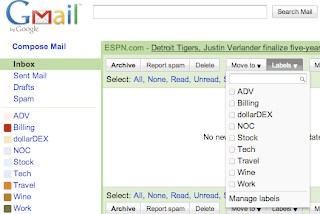


Architecturally, have you noticed any difference between Gmail and other mail servers?

Gmail does not have a Folder concept. It uses the Label concept. All emails, when filtered, are applied with a label. After filtering, they are still sent to the same INBOX.


Gmail's filtering is to attach a label to an email. After labeling, this email will "disappear" from the INBOX and "appear" when the label is clicked.


Ok, no big deal, I thought. So I went ahead to create my 1st filter.


I tried "Skip Inbox" so that this email will not appear in my INBOX. Then I applied "ADV" label. Simple!


After the filter was created, I could still receive emails from the above From-address in my BlackBerry. Strange.


I created my 2nd filter.


I tried "Skip Inbox" so that this email will not appear in my INBOX. Then I applied "ADV" label. Same as what I have previously done. But, in addition, I clicked on "Mark as read".

This does the trick! Emails that are read will not be pushed to BlackBerry or any PushMail handsets.


However, is this method good?

Personally, no. When I go back to my Gmail via a browser, I would still want to read those filtered emails. Ideally, their status should be unread so that I know I have not read them yet.

But with Gmail, this is not possible. Luckily, I do not use Gmail for business.


Friday, February 5, 2010

Mail Filtering


If you have a BlackBerry like me or any PushMail enabled phone, it's annoying to receive unimportant or non-targeted emails. It will be ideal to receive only qualified emails.

The way to achieve that is to configure Mail Filter. (See diagram below)


From my experience, I also find that the sequence when Mail Filter kicks in is also important. The most effective method is to filter emails before they reach the INBOX.

This will ensure that only important emails are being push to your BlackBerry or any PushMail enabled handsets.


Tuesday, November 24, 2009

Cons of porting to Google Apps


I am a subscriber of the popular iPlanet Messaging Server User Forum. Link here.


There's a discussion to investigate the pros/cons of Sun Java Communications Suite versa Google Apps.

Btw, Google is heading strongly into Education arena these days. Well, who's not interested in the capturing the bigger fish?

I'm pretty interested in following this discussion because we are also in the Corporate Email Hosting business via OpenMail.SG brand. I'm also being asked the same question multiple times. My response's here.

There's a reply:
I talked to someone from XXX last year, they moved to google apps. The issues he talked about were concerns about privacy, high project effort for the transition, and (lack of) support. The provider does not offer things like moving or renaming accounts for instance. And one has to be aware that the users will still contact the university helpdesk if there is a problem, so you still will have to provide support.

XXX ended up providing their users a choice between an institutional email account or google mail.

It ended with the following:

There is a Dutch saying: only the sun rises for free.

Saturday, October 17, 2009

Google Docs Backup

There is this new product released in Google Solutions Marketplace - Google Docs Backup.


I find it amusing.

Firstly, if one decides to go with Google Apps, then he must be attracted by the Cloud and the convenience of accessing it anytime, anywhere. (Not not being restricted to his desktop)

Secondly, if one does not feel comfortable (in terms of security and "safe-ness" of one's data) with hosted service (that's what cloud is), then one should not even jump into the wagon.


Why would you need to backup your Cloud data? Strange. Dun tell me the data in the Cloud does not have redundancy and backup in place?

Sunday, September 27, 2009

Push Gmail Support


I can't stop admiring at the wonderful work from Gmail. The engineers behind Gmail keeps pushing out new features weeks in weeks out. 


Recently, they announced that you can now get your Gmail messages pushed directly to your phone. Read here.

If a company is cash rich, it can really do wonders! Well, provided you get the Right People, of course! 


Monday, August 31, 2009

Search indexing could create fear at times


A long-time friend of mine told me something that amused me. The church that he attends was looking for a mail hosting solution. Being a technologist, he suggested Google Apps as it's free and thus cost-saving for the church.

Oh no, Gmail? No, no ... we should not use Gmail. It indexes the emails that are in our mailboxes. Others might accidentially read our emails if they search for them!

Sometimes, it's hard to explain to the layman how high-tech innovation like Gmail works.

:)

On a more serious note, we being technologists should try our best to explain technology in simpler term. Otherwise, customers see no value in spending with us.


Friday, August 28, 2009

HAWKMail - if only the URL can be friendlier


I saw an article mentioning that a American college (HACC) has just migrated their mail system to Google Apps. I went to take a look since it's such a hype to adopt Google Apps these days.


Looks good. It makes business sense to migrate to Google Apps (or even Sun Java System Communications Suite :> ) if you manage a huge number of mailboxes. The operating cost per mailbox will drastically reduce.

Anyway, I scroll down and saw that to access HAWKMail, the URL is http://mail.HAWKMail.hacc.edu.


I went ahead to click on it. I was redirected to the customized login page on Gmail. I did not like what I saw. (".... www.google.com/a/hawkmail.hacc.edu....")


If only the URL can be rewritten to be privately labelled to HACC brand ...

That would be nice!


Wednesday, August 26, 2009

Integrate Google Apps with BlackBerry Enterprise Server

We like what we see from the work from the Google team - they simply can make anything happen, if they want to.


Some of our customers run Google Apps and the higher management wants to continue to use their Blackberry. The connector has come timely.

Well done, Google!


Thursday, August 13, 2009

Sendmail Sentrion Gmail Security Appliance Solution for Google Apps

A long-time telco customer ping-ed me asking for my opinion on securing Sendmail with TLS. I helped deployed their load-balanced Sendmail nodes few years ago.

I started reading up on Securing Sendmail with TLS. Not too difficult to implement he wants to proceed with the idea.  

Then I came across a solution from Sendmail - Sendmail Sentrion Gmail™ Security Appliance Solution for Google Apps™

Read here for more details. 


Pretty interesting architecture. But ... will there be any taker? :) 


Sunday, June 21, 2009

Gmail Aliases

Released in Jan 2009, Gmail now offers address aliases.

Gmail doesn't offer traditional aliases, but you can receive messages sent to your.username+any.alias@gmail.com. For example, messages sent to jane.doe+notes@gmail.com are delivered to jane.doe@gmail.com.

You can set up filters to automatically direct these messages to Trash, apply a label or star, skip the inbox, or forward to another email account.

Slightly different from the shared folder concept in Sun Java System Messaging Server which I wrote about 2 days ago. 

Gmail offering is more suitably used as a filtering tool.