Wednesday, September 22, 2010

Gmail Priority Inbox

When Gmail launched Priority Inbox, I was initially not interested. That's why I did not enable the feature until today.


To know more about how Priority Inbox works, read here.

I just enabled it while having a lengthly meeting in a customer's site. I'm just impressed!


With Priority Inbox, there is this little section right at the top of your inbox (highlighted in RED). To me, it looks like a simple Executive Summary. So simple, so convenient. 

.

Wednesday, September 15, 2010

Blackberry Email & Calendar Sync with Sun Communications Suite

I just finished installing Sun Calendar Server to a customer's existing Sun Messaging Server infrastructure over the weekend in the Philippines.

Some of their directors use Blackberry. With the newly installed Calendar Server, they hope to sync their Blackberry devices.


I told them there are 2 approaches.


Approach 1: Blackberry sync with Outlook via USB

a. Install Sun Java System Connector for Microsoft Outlook
b. Sync Mail & Calendar from Sun Comms Suite 6u2 (Mail & Calendar) with Outlook
c. Sync Blackberry with Outlook via USB

Supported OS
Runs on Microsoft Windows 2000 (SP3 or higher), Windows XP (SP1 or higher), Windows 2003 Terminal Server, and Windows Vista

Supported Outlook
Supports Microsoft Outlook 2003 and 2007

Read here.


Approach 2: Blackberry sync over-the-air

a. Purchase NotifyLink Enterprise Server
b. Install and Configure to connect to Sun Comms Suite 6u2 (Mail & Calendar)
c. Blackberry sync with NotifyLink over-the-air


Read here.


Note: If users only want to "sync" email with Sun Messaging Server with Outlook, no connector is required. It works out-of-the-box via POP or IMAP protocol.

.

Wednesday, September 8, 2010

OpenSSO Identity Services

Besides Policy Agent that performs authentication and authorization, OpenSSO offers Identity Services to helps authenticate users who access protected applications.


The Identity Services are accessible via SOAP/WSDL and REST.

Basically, no difference from those offered by Policy Agent:


  • Authentication and Single Sign-on — Verification of user credentials
  • Authorization — Permission for authenticated users to access secured resources
  • Provisioning — Creation, deletion, search, and editing
  • Log — Ability to audit and record operations


The only difference is developers have to code by themselves to achieve the above 4 functionalities.
More flexibility if you look at it positively. Of course, more effort required.

.

Monday, August 30, 2010

OpenSSO Data Stores

There are a few data stores which we need to configure in OpenSSO.


1. Authentication Data Store assists in users' authentication

2. Identity Data Store holds the users' profiles
  • Usually, there is a 1-to-1 mapping between a user in the authentication data store and a user in the identity data store
  • Authentication data can also be stored together with Identity Data Store
  • i.e. The Sun LDAP is used for both Authentication and Identity
  • The reserve is also true: Active Directory can be configured for both purposes


3. Configuration Data Store is used for storing service configuration data and other information pertinent to the server's operation. Policies are also stored here. 
  • We used to store Configuration data in Sun LDAP as well
  • However, since version Access Manager 8.x (aka OpenSSO 8.x), these data is now stored in the embedded OpenDS.  
  • This embedded OpenDS makes configuration for high-availability easier - less work to do

.

Sunday, August 29, 2010

Difference between Web and J2EE Policy Agents


In OpenSSO, there are 2 types of Policy Agent to choose. Customers always get confused on which type and on which tier to deploy in their environment. 

The following diagrams illustrates clearly. Based on the Selection Criteria, Web Policy Agent will be deployed on the Web tier. 


J2EE Policy Agent will be deployed on the Application tier.


PS: If J2EE Policy Agent is deployed on the Application tier, there is no need for Web Policy Agent to be deployed on the Web tier. Simply allow the pass-through on the web server and let the Policy Evaluation be carried out on the Application tier.


.

Thursday, August 26, 2010

OpenSSO and Enterprise SSO Selection Criteria

I have been busy involving in the design of a Single Sign-On (SSO) and Enterprise Single Sign-On (ESSO) solution for a local ministry.

They have a few hundreds applications (web-based and non web-based). Thus we need to have a concise selection criteria for them.


There are 2 types of policy agents available from OpenSSO:
1. Web Policy Agent
2. J2EE Policy Agent

In order to integrate applications for Single Sign-On with OpenSSO, they must be:
1. web-based
2. authenticate with a common authentication repository
3. supported by available policy agents from OpenSSO

If applications are customizable, Web Policy Agent will be chosen. Otherwise, if applications are pure J2EE-based that utilize the Java Authentication and Authorization Service (JAAS), then J2EE Policy Agent will be chosen.

If the above 2 criteria cannot be met, then ESSO will be chosen.


.

Automatic spam detection for comments

Salute to Blogger! There is now a feature to automatically detect spam for comments ...


I love this feature since I have been spending time manually removing spammed comments for the past months.

.

Friday, August 13, 2010

Oracle Directory Services Directory Server Enterprise Edition 11gR1

Sun Directory Server Enterprise Edition (DSEE 7.0) has now been rebranded as Oracle Directory Services Directory Server Enterprise Edition 11gR1. It is now part under the Oracle Fusion Middleware umbrella.


Read here.

.

Tuesday, August 10, 2010

OpenSSO Distributed UI Server & Windows Desktop SSO


For security reason, OpenSSO Distributed Authentication UI Server is recommended to "front" the OpenSSO Server that sits behind the firewall. For better performance, you can deploy multiple DAUI Servers with multiple OpenSSO Servers.


However, do note that if you deploy a Distributed Authentication UI Server in front of your protected OpenSSO Server, then Windows Desktop SSO is not supported.


Read here.

.

Friday, July 23, 2010

How to disable SSL on Sun Directory Server?

I got a call from my customer asking how to manually disable the SSL on his faulty Directory Server.


Edit dse.ldif. Locate dn: cn=config:


nsslapd-security: on
nsslapd-secureport: 636


Solution:

1. Stop Directory Server
2. Remove the above 2 lines
3. Add the following line:
nsslapd-security: off
4. Start Directory Server


Done!


.

Thursday, July 22, 2010

Why a Directory Consumer is not read-only? - Part II

Continue from my previous post ...

Master: ds-master.singapore.sun.com:389
Consumer: ds-slave.singapore.sun.com:1389


Let's perform a modification operation on the Consumer. I modified the entry for CLow2.

Below is what you'll observe in the access log of the Consumer:


[20/Jul/2010:02:26:28 +0800] conn=0 op=99 msgId=2098 - MOD dn="uid=CLow2,ou=People,dc=singapore,dc=sun,dc=com"
[20/Jul/2010:02:26:28 +0800] conn=0 op=99 msgId=2098 - RESULT err=10 tag=103 nentries=0 etime=0

The consumer rejects modification operation (err=10). It kicks started the referral process to redirect the MOD request to the master.


Below is what you'll observe in the access log of the Master:

[20/Jul/2010:02:26:28 +0800] conn=63 op=1 msgId=2100 - MOD dn="uid=CLow2,ou=People,dc=singapore,dc=sun,dc=com"
[20/Jul/2010:02:26:28 +0800] conn=63 op=1 msgId=2100 - RESULT err=0 tag=103 nentries=0 etime=0

The master process the modification request successfully (err=0).


Below is the dse.ldif file on the Consumer:

dn: cn="dc=singapore,dc=sun,dc=com",cn=mapping tree,cn=config
objectClass: top
objectClass: extensibleObject
objectClass: nsMappingTree
cn: "dc=singapore,dc=sun,dc=com"
nsslapd-backend: userRoot
nsslapd-referral: ldap://ds-master.singapore.sun.com:389/dc%3Dsingapore,dc%3Dsun,dc%3Dcom
nsslapd-state: referral on update
modifiersName: cn=server,cn=plugins,cn=config
modifyTimestamp: 20090923115909Z
numSubordinates: 1


Below is the dse.ldif file on the Master:

dn: cn="dc=singapore,dc=sun,dc=com",cn=mapping tree,cn=config
objectClass: top
objectClass: extensibleObject
objectClass: nsMappingTree
cn: "dc=singapore,dc=sun,dc=com"
nsslapd-state: backend
nsslapd-backend: userRoot


.


Wednesday, July 21, 2010

Why a Directory Consumer is not read-only?

This is an interesting question.

In my customer's environment, he has a pair of Sun Directory Servers acting as Masters. The data in the pair is kept in-sync via Multi-Master Replication (MMR).

There are 4 Sun Directory Servers acting as consumers. The data are replicated from the 2 Masters.

Recently, he found out that when he modifies entries on any of the Consumers, the modified entries are updated to the Masters!

This violates the concept of a Consumer, according to what he understands of the term.


Well, let's take a close look at the following diagram:


The diagram illustrates a Master-Consumer deployment architecture. 

Did you notice there is a dotted arrow pointing from the Consumer back to the Master? This is the Referral that is causing the "side-effect". 


Ok, it's not "side-effect". It's a product feature of Sun Directory Server. 

Whenever there is a modification request on the Consumer, the Referral will redirect the request back to the Master. The Master will be the one that actually updates the entries. The Consumer can never process a modification request, it can only perform a search request

.


Saturday, July 17, 2010

OpenSSO Multi-Servers Mode

There are at least 2 data stores in OpenSSO - Configuration and User data stores.

The older version of OpenSSO, which is Sun Java System Access Manager, does not utilize an embedded Configuration Data Store. As such, we usually utilize the same Sun Java System Directory Server to store both the configuration and users information. (unless, the users information are stored in Active Directory)

In OpenSSO, OpenDS is embedded to store Configuration information. It comes pre-installed with every OpenSSO bundle.

In fact, the recommended deployment approach is not to change this embedded data store.

Using the OpenSSO Enterprise embedded configuration data store can lower response time and ensure service availability when machine failure occurs.


What I like about this embedded data store is: if you scale by adding another node, there is nothing you need to do to ensure the configuration information are replicated and always in-sync. Replication is taken care of, transparently.

Nice!

.

Sunday, July 11, 2010

OpenSSO Authentication and Authorization Interactions

While refreshing myself with OpenSSO, I came across this diagram that illustrates very clearly how OpenSSO and Policy Agent operates in a Access Control environment.


I love diagram that is simply, yet tells a complete story of a product's capability.

.

Friday, July 9, 2010

How to reset DSCC Directory Service Manager password?

I was with a customer the other day. He has another Sun Directory Server setup by another vendor long time ago. He attempted to login to DSCC, but he was not able to remember the "admin" (Directory Service Manager) password.


Some forums I searched talked about resetting the Service Manager password via the DSCC console. What a joke! :) I can't even login, how am I able to reset password via DSCC console?


Changing password via DSCC console


There are 2 ways to resolve this issue:


1. To dismantle and initialize DSCC again

bash-3.00# ./dsccsetup dismantle
:
bash-3.00# ./dsccsetup initialize
:
Registration is on-going. Please wait...
DSCC is registered in Sun Java(TM) Web Console
:
DSCC agent has been successfully registered in Cacao.
***
Choose password for Directory Service Manager:
Confirm password for Directory Service Manager:
Creating DSCC registry...
DSCC Registry has been created successfully
***

Simple. But of course, previous configuration of registered servers are gone. You need to register again.


2. Change password via CLI

Some basic concepts first.


bash-3.00# ./dsccsetup status
***
:
DSCC Registry has been created
Path of DSCC registry is /var/opt/SUNWdsee/dscc6/dcc/ads
Port of DSCC registry is 3998
***


  • DSCC configuration are stored in a LDAP database at port 3998
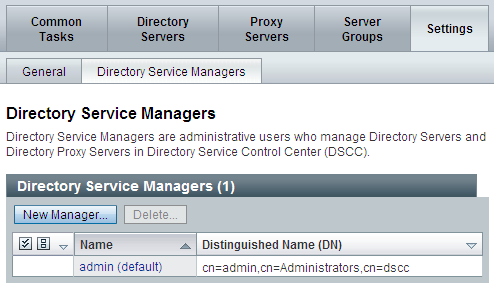
  • Service Manager is known as cn=admin,cn=Administrators,cn=dscc in this LDAP database (see screenshot above)
  • "cn=Directory Manager" credential is required to modify the Service Manager password 
  • The funny thing is the default password for "cn=Directory Manager" is the same as Directory Service Manager. (see dsccsetup initialize above. the steps are so simple. it assumes both to have the same password) 


So we need to perform 2 steps:


Step 1 - Change the Directory Manager password


bash-3.00# /opt/SUNWdsee/ds6/bin/pwdhash -D /var/opt/SUNWdsee/dscc6/dcc/ads -s SHA password2
{SSHA}qFcXDQCKZ4u4GyrM8Uw4uGOHdsnVPP9MaC0WeQ==


bash-3.00# cd /var/opt/SUNWdsee/dscc6/dcc/ads/
bash-3.00# ./stop-slapd
bash-3.00# cd /var/opt/SUNWdsee/dscc6/dcc/ads/config
bash-3.00# cp dse.ldif dse.ldif.OLD
bash-3.00# vi dse.ldif
At dn: cn=config
Replace:
nsslapd-rootpw: {SSHA}guaZfnFtTHeT8EpWpBhuRlBCMLWpdgt0tBvfBw==
with:
nsslapd-rootpw: {SSHA}qFcXDQCKZ4u4GyrM8Uw4uGOHdsnVPP9MaC0WeQ==


bash-3.00# ./start-slapd


Step 2 - Change the Service Manager password

bash-3.00# ldapmodify -p 3998 -D "cn=Directory Manager"
Enter bind password:
dn: cn=admin,cn=Administrators,cn=dscc
changetype: modify
replace: userPassword
userPassword: password2 <-- Rest assured. This password will be hashed during modification.


modifying entry cn=admin,cn=Administrators,cn=dscc


Done!

.

Thursday, July 8, 2010

DSCC deployment with firewall

In a production environment, there are always firewalls. This is for sure.

Below is a typical deployment of a pair of Sun Directory Servers deployed in 2 data centers. They are configured for Multi-Master Replication (MMR).


This deployment is simple. Only port 389 (bi-directional) is required to be enabled on the firewall.

Now, if the Administrators are all stationed in Data Center 1 where DS 1 is and they would like to manage all Directory Servers via DSCC (Directory Server Control Control), we have a challenge.


We need to understand how DSCC, Cacao and Directory Server works.

Basically, DSCC manages Directory Server instances through Cacao agent. On each physical server where Directory Server is installed, we need a Cacao agent installed as well. This agent runs on port 11162 by default.

Now, if we make changes to the Directory Server configuration, there is a need to update the DSCC registry. This ensures the states are kept intact. DSCC registry runs on port 3998 and 3999 (SSL) by default.

So, what do we need to configure on the firewall?

  1. Port 11162 (uni-directional) from DS1 to DS2
  2. Port 3998 and 2999 (uni-directional) from DS2 to DS1
  3. Port 636 (bi-directional) <- for starting/stopping Directory Server via DSCC (Thanks, Teck Meng!)


.

Wednesday, July 7, 2010

Bind to specific IP address for Sun Directory Server

Some customers have powerful machines. It would be a waste to install a single instance of Sun Directory Server on each machine.

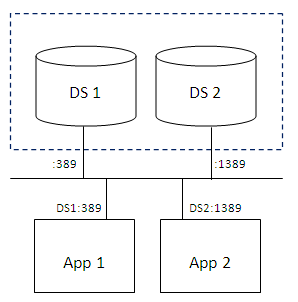
When you have more than 1 instance of Directory Server running, you'll end-up having the following architecture most of the time. Port 389 will be assigned to the 1st instance; while Port 1389 will be assigned to the 2nd instance.

Some application developers do not like to use port other than 389. Or corporate policy does not encourage that. I have encountered customers who dictate Directory Service to be only served via port 389, and nothing else.

So, we'll end up having to redesign the architecture to be the one shown below:


Now, the prerequisite is that the machine has to either support multi-home or have more than 1 NIC interface. This is to ensure that port 389 will not clash when both instances attempt to start.

In addition, we need to add the following entries into the dse.ldif for DS1 and DS2.

nsslapd-listenhost: ip-address-[1,2]
nsslapd-securelistenhost: ip-address-[1,2]


Remember to stop DS first; add entries; start DS.


Note: By default, both entries are missing from dse.ldif, which implies 0.0.0.0 is taken as default value.


.

Friday, June 25, 2010

Disallow anonymous access to Sun Directory Server

I received an email from my customer a week ago.

Even when a new instance is created, the default ACI allows anonymous to access this? Any ideas?

My reply below:

Yes, Sun Directory Server is built as-such. It behaves like a "Yellow Pages" sort-of. E.g. In a corporate directory server, anyone can search for anyone by default, with the exception of password.


This site from IBM explains better than me.

Searching a directory is similar to looking up a name in the white or yellow pages of a telephone directory. If the name of a particular individual object is not known, the directory can be searched for a list of objects that meet a certain requirement.


So we know that, by default, the Directory Server is accessible anonymously.


How can we disable this function?

Very easy. I did the following for another customer of mine in Thailand.


  • Remove the following segment in 99user.ldif in the config/schema directory
dn: o=XXX aci: (target ="ldap:///o=XXX")(targetattr !="userPassword")
(version 3.0;acl "Anonymous read-search access"; allow (read, search, compare) (userdn = "ldap:///anyone");)


Easy. But do remember to stop/start the Directory Server.


.

Thursday, June 24, 2010

Oracle Directory Server in YOG


I just received a call from my counterpart in Oracle (ex-Sun) asking for my availability in AUG to support a critical Directory Services infrastructure.

I was curious and probed further... 

... and I was told that the YOG (Youth Olympic Games) that is going to be held in Singapore is using Oracle Directory Server (aka. Sun Java System Directory Server) and my service might be required.


It's my honor definitely.

However, I have a national obligation (aka Reservist) during that period of time. If time permits and the money is right, I'll try to make myself available. I'll talk to my boss in the Army. Ha. :)


.

Monday, June 21, 2010

Sun Software Product Map - Part III

If you take a good look at the list, you'll notice that OpenDS is missing.


FYI, there is a commercial version of OpenDS - Sun OpenDS Standard Edition.

From what I know, Oracle is still defining the strategy for OpenDS. Until then, we do not know what will happen to OpenDS.

A lot of development work has been poured into OpenDS. It's a total rewrite in Java from Sun Java System Directory Server. I'm keeping my fingers crossed.


By the way, Directory Service is another strength of us. So we'll be watching closely on the development of OpenDS.


.