Friday, November 9, 2012

Changing the password of cn=Directory Manager in OpenAM

With default installation of OpenAM, the passwords for amadmin and cn=Directory Manager (for embedded OpenDJ) are the same.

Some customers would like to make the 2 passwords distinct. And some even want the passwords to be changed every 90 days based on their corporate security policies.

Assumption


1. OpenAM Configuration Directory : /home/openam10/var/openam
2. Perform Step 1 to 3 while OpenAM server is shutdown


How to change the password of cn=Directory Manager?

Step 1: Create a class to generate the encoded password for bootstrap file


[openam10@am10 crypt]$ java -cp .:../ssoadmin/lib/opensso-sharedlib.jar:../ssoadmin/lib/amserver.jar AZCrypt password

AQIC5wM2LY4SfczLlj6134qMTx0nkE5XiFMg  (old password)

[openam10@am10 crypt]$ java -cp .:../ssoadmin/lib/opensso-sharedlib.jar:../ssoadmin/lib/amserver.jar AZCrypt P@ssw0rd

AQIC5wM2LY4SfcyUmw%2B6K%2FG%2FBYPuMDaX2Tj3 (new password)


[openam10@am10 ~]$ cd /home/openam10/var/openam
[openam10@am10 openam]$ cp bootstrap bootstrap.BAK.20121109
[openam10@am10 openam]$ vi bootstrap


Replace the existing password (AQIC5wM2LY4SfczLlj6134qMTx0nkE5XiFMg) with the new one (AQIC5wM2LY4SfcyUmw%2B6K%2FG%2FBYPuMDaX2Tj3).


Step 2: Change encoded password for OpenDJ Configuration file


[openam10@am10 ~]$ cd /home/openam10/var/openam/opends/bin

[openam10@am10 bin]$ ./encode-password -s SSHA512 -c P@ssw0rd
Encoded Password:  "{SSHA512}rPyik4bSqX68JnmpWolSIn/IL6SpKyuThh1yho3fPSFDR6qYS+RcKKgfqZ5zVdVXt4S34nE7syBQSXQQxrO9+DgdeaUV2Uf5"


[openam10@am10 ~]$ cd /home/openam10/var/openam/opends/config
[openam10@am10 config]$ cp config.ldif config.ldif.BAK.20121108
[openam10@am10 config]$ vi config.ldif


Replace userPassword with the one generated by encode-password as shown above.


Step 3: Change encoded password for Directory Server Configuration in OpenAM
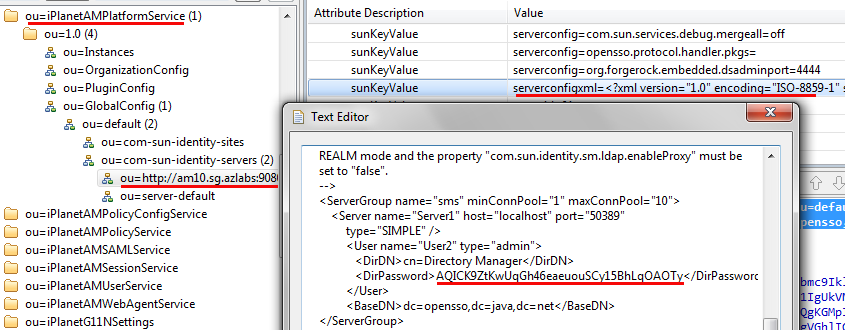


[openam10@am10 ~]$ cd /home/openam10/var/openam/opends/bin
[openam10@am10 bin]$ ./start-ds


Navigate to the following dn with a LDAP tool like Apache Studio:


dn: ou=http://am10.sg.azlabs:9080/openam,ou=com-sun-identity-servers,ou=default,ou=GlobalConfig,ou=1.0,ou=iPlanetAMPlatformService,ou=services,dc=opensso,dc=java,dc=net

Replace DirPassword with the one generated by encode-password as shown above in Step 2.


At this moment, let's do a check-point...

If the above steps are not executed correctly, you'll see the famous OpenAM Configuration Options Page when the OpenAM server is next started.


Otherwise, everything should be good and you'll see the OpenAM Login Page as expected.


Step 4: Change password for Policy Configuration in OpenAM


This last step can be configured when the OpenAM server is up and running with the new password for cn=Directory Manager. Of course, it's definitely possible to change the password via a LDAP tool like Step 3. (But I'm just lazy to do it after hacking for so long. Ha!)


.


Saturday, November 3, 2012

Changing the password of amAdmin

Changing the password of amAdmin is very simple in OpenAM.

Navigate to Subjects and click on amAdmin. (Note: Regardless of the type of datastore that has been created, amadmin will always be shown as a subject. In this example, my datastore is an Active Directory.)


Click on "Edit". Then change password.


Done.

.

Friday, November 2, 2012

OpenAM Policy Agent Audit Logging to Database

In my customer's OpenAM environment, database logging is configured instead of file-based logging.


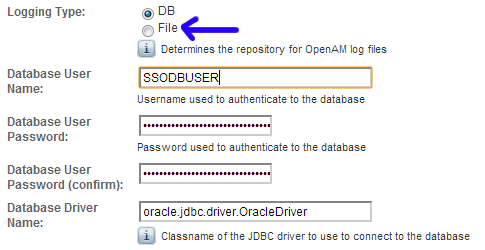
To enable database logging, we need to navigate to Configuration -> System -> Logging. The default Logging Type is File. Switch to DB. My customer back-end database is Oracle 11g RAC.


When this is done, restart OpenAM server and logging will be redirected to the Oracle database. 

Next, my customer likes to track what his users are doing for every Policy Agent that have been deployed. So audit logging has to be turned on at the Policy Agent configuration. In addition, customer would like to centralize the logging. This means logging shall be consolidated at the OpenAM servers. 

Easy, the default Audit Access Types is LOG_NONE. Switch to LOG_ALLOW. Next, select REMOTE for Audit Log Location. Cool, it's done!


Well .... but no... the database shows nothing. There isn't a new table created for this agent. Restarted a few times, nothing. Strange!

So we dig into the CoreSystem debug log and found this:

WARNING: amAgent_esys-uat_abc_com_18081_log:DBHandler:Maximum DB memory buffer size < Buffer Size, setting to buffer size (25)
DBHandler:tableName = amAgent_esys-uat_abc_com_18081_log, LOG_STATUS = ACTIVE
amAgent_esys-uat_abc_com_18081_log:DBHandler: the query string for creating is create table amAgent_esys-uat_abc_com_18081_log (time date,  data CLOB, LoginID varchar2 (255), ContextID varchar2 (255), IPAddr varchar2 (255), LogLevel varchar2 (255), Domain varchar2 (255), LoggedBy varchar2 (255), MessageID varchar2 (255), ModuleName varchar2 (255), NameID varchar2 (255), HostName varchar2 (255)) 
ERROR: amAgent_jboss_truecorp_co_th_18443_log:DBHandler:createTable:Execute:SQLEx (972): ORA-00972: identifier is too long
ERROR: amAgent_jboss_truecorp_co_th_18443_log:DBHandler: sql operation unsuccessful (972): ORA-00972: identifier is too long

Ah! It's a Oracle table name restriction!

The default Remote Log Filename is being used as the Oracle table name, but the length is too long for Oracle to accept.

Changed to a shorter name. Restarted OpenAM server and Policy Agent. It works!


.

Thursday, November 1, 2012

Weird OpenAM Policy Agent Evaluation Behavior

I am now in the implementation of a OpenAM project in Bangkok, Thailand.


This afternoon, we encountered a very weird issue with the OpenAM Policy Agent. The background story is the customer has 4 policy rules created. The port number was initially wrong. The customer then changed from port 18081 to the correct 18080 as seen below.


The OpenAM server was restarted a few times, so did the server where the Policy Agent was installed. But whenever a protected page is accessed, the old policies were still been evaluated (rules with port 18081 were still found in agent debug log).

So there were 8 policy rules, instead of the intended 4. And the evaluation result was also consistently incorrect.


It took us quite a while to resolve the issue. 

Before I resolved the issue, I interviewed the customer what they were doing while amending the old rules. And I was told the OpenAM Admin Console was "buggy" and sometimes it did not saved what they have keyed in. At times, when they clicked on "Save" more than once, they'll be prompted with something like "policy/rule already exists".


This triggered me to an issue I encountered a year ago on another OpenAM project back in Singapore. So I  opened Apache Directory Studio to connect to the embedded OpenDJ.

From my experience with that project, I know that when a "Save" is clicked on the OpenAM Admin Console, OpenAM will write to 2 places in the OpenDJ. (Yes, we turned on audit logging on OpenDJ back then)

The 2 places are:
1. ou=Policies,ou=default,ou=OrganizationConfig,ou=1.0,ou=iPlanetAMPolicyService,ou=services,xxx
2. ou=default,ou=default,ou=OrganizationConfig,ou=1.0,ou=sunEntitlementIndexes,ou=services,xxx

And that's where I found the issues!


The entries in ou=sunEntitlementIndexes are "corrupted"! It still contained the 4 old policy rules.

So, we went ahead to remove all 8 policies that belong to POL_UUI-1 (for this customer's example). Then we clicked on "Save" again on the OpenAM Admin Console. This will populate the correct rules (rules with port 18080) back to OpenDJ again.


That's it! Hard work.

.

Friday, October 12, 2012

Anti-Virus Comparatives

Since the day Google announced Postini is going "EOL" in the coming year (to be replaced by Google Apps, which is far more inferior by many reports), many AV vendors have been chasing existing Postini customers, including us and our customers.


The above is a pretty good chart comparing the various AV products out there. Good for evaluating before making a final decision in months to come.

.

Thursday, September 13, 2012

OpenAM : No Configuration found

My colleague hit into "No configuration found" error yesterday when trying to configure a new Authentication module.

Once the new module is configured and when he accessed the OpenAM Login Page, the following screen will be shown:


It took me a while to resolve this... and a very strange error indeed.

The module name cannot have a "." character in it. He was using "SSOSG.AD". When he changed to "SSOSGAD", everything works!


.

Sunday, August 12, 2012

No such Organization found

There was a discussion in OpenAM mailing list few days ago with regard to an error - "No such Organization found". 


When such an error occurs, there are a few possibilities. One of it is a mis-configuration in Realm/DNS Aliases, such that an identical alias is created in different Realm.
 
The following shows an alias "idp.azlabs.sg" being created in Top Level Realm.


The same alias "idp.azlabs.sg" is also being created in Realm "testrealm".


When such a setting is configured, "No such Organization found" error will be displayed when a user or administrator attempts to login via OpenAM login page. As such, you are stuck if you are an administrator! There is no way you can login via the GUI.

How to resolve this issue?


* Use a LDAP browser to explicitly delete the duplicate alias.

The following is the alias which we want to keep:


The following is the duplicate alias which we need to delete:


Delete the entry "sunxmlKeyValue=sunidentityrepositoryservice-sunOrganizationAliases=idp.azlabs.sg" will do the trick! Remember to restart OpenAM server.


By the way, the following error is captured in Authentication debug log - "Multiple mappings found for organization identifier: idp.azlabs.sg".


This is where a lot of people failed to check before posting their questions in the mailing list. If one could look at the Authentication debug log in detail, the root cause is pretty obvious.

.

Tuesday, August 7, 2012

Sun Directory Server EOL Dates

I have a few customers who are still running Sun Java System Directory Server Enterprise Edition 6.3.x. One of them called me this morning wanting to know when will 6.3.x support ends.

I think the following information is helpful.


Note: Support for Sun DSEE 6.3.x ends on Dec 2013 and there is no extended support. Any customer who wants to continue to use Sun DSEE has to migrate to 7.x.


.

Wednesday, June 27, 2012

Password Reset Capability in OpenAM

Why do I like OpenAM that much after all these days (from Sun Access Manager, to Sun OpenSSO, to ForgeRock OpenAM)?

The answer is simple: it's highly flexible.

For automatic generation of a random password after a reset, there is always a default implementation - PasswordGenerator that comes out-of-the-box.


So what if this default implementation does not suit what your customers want? Write your own implementation! That's what I like about it - the flexibility to hook in my own plugin.

For password reset notification, the default implementation - NotifyPassword uses email medium to alert users.


If your customers require a SMS notification, what do you do? Write your own implementation! That's what I like about it. :)

Well, maybe not for those who do not like to code though. :>

.

How to enable old password prompt?

I'm preparing a POC for a customer in Thailand to showcase the capability of OpenAM integrated with their Microsoft Active Directory.

One of the requirement is to be able to change password, but the user must be prompted to enter his old password first.


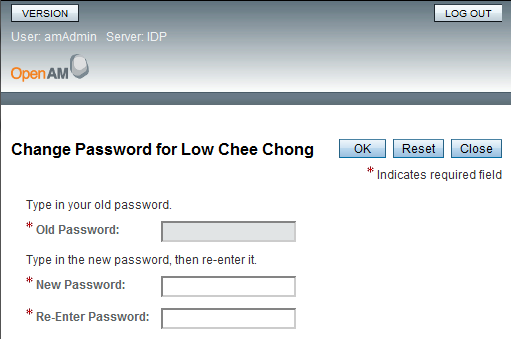
The default Change Password UI from OpenAM has the filed greyed out.


To enable old password prompt, go to Configuration -> Console -> Administration. Enable "Prompt user for old password".


It's enabled now. Nice!


.

Saturday, June 23, 2012

LDAP Error 53: The LDAP server is unable to perform the specific operation

I was trying to configure a AD Data Store. 

It was pretty straight-forward to get the AD Data Store configured. If configured properly, all AD users will be displayed according in the Subjects tab.

So, I went ahead to create a new user. (OK, just for testing purpose. I have never used OpenAM to provision users in production before. There are far better tools in doing the same.)


BOMB! I received "LDAP Error 53: The LDAP server is unable to perform the specific operation" when I clicked OK.


What could have gone wrong?


LDAPv3Repo: Create called on IdType: user: forgerocker attrMap = {uid=[forgerocker], unicodePwd=xxx..., sn=[Rocker], inetuserstatus=[Active], givenname=[], cn=[Forge Rocker]}
:
:
LDAPv3Repo:06/18/2012 09:51:10:065 PM SGT: Thread[http-apr-8180-exec-1,5,main]
    : before ld.add: eDN=cn=forgerocker,cn=users,DC=az-ex,DC=sg
LDAPv3Repo:06/18/2012 09:51:10:207 PM SGT: Thread[http-apr-8180-exec-1,5,main]
ERROR: LDAPv3Repo.create failed. errorCode=53  0000001F: SvcErr: DSID-031A11E5, problem 5003 (WILL_NOT_PERFORM), data 0

LDAPv3Repo:06/18/2012 09:51:10:207 PM SGT: Thread[http-apr-8180-exec-1,5,main]
LDAPv3Repo.create failed
com.sun.identity.shared.ldap.LDAPException: error result (53); 0000001F: SvcErr: DSID-031A11E5, problem 5003 (WILL_NOT_PERFORM), data 0

at com.sun.identity.shared.ldap.LDAPConnection.checkMsg(LDAPConnection.java:5523)
at com.sun.identity.shared.ldap.LDAPConnection.add(LDAPConnection.java:3234)
at com.sun.identity.shared.ldap.LDAPConnection.add(LDAPConnection.java:3255)
at com.sun.identity.shared.ldap.LDAPConnection.add(LDAPConnection.java:3181)
at com.sun.identity.idm.plugins.ldapv3.LDAPv3Repo.create(LDAPv3Repo.java:2100)
at com.sun.identity.idm.server.IdServicesImpl.create(IdServicesImpl.java:442)
at com.sun.identity.idm.AMIdentityRepository.createIdentity(AMIdentityRepository.java:384)


A google search solves the issue.. the connection from OpenAM to AD must be in SSL mode. Read here and here for detailed explanation. This is due to the attribute unicodePwd in AD. 


So I went ahead to enable my AD for SSL and re-configure the AD Data Store in OpenAM to connect via SSL.


Well, the following error is ever so common ... "PKIX path building failed: .... unable to find valid certification path to requested target"


Always happen without fail if self-signed certificate is used. :) Well, importing the Root CA cert of the self-signed certificate into the cacerts store in JDK will resolve the issue.

.


Ignore User Profile in OpenAM


There are 4 ways to control whether a user profile is required for authentication to be successful in OpenAM.

The default is Required and the next popular is Dynamic. I have never tried Ignored before. 


So I went ahead to test what to expect if Ignored is chosen.

1. I created a AD authentication module
2. I purposely ignored creating a corresponding AD data store
3. I even went to the extend of deleting the default OpenDJ data store


The following is the screen when my AD user successfully authenticated - "You've logged in".
The end user console is skipped from displaying.


A session is still created when you navigate to the Session tab in OpenAM Admin Console.


.

Wednesday, June 20, 2012

OpenAM Active Directory Data Store

If you create an Active Directory Data Store post-installation, then you'll come across this screen. The instruction (see here) was clearly stated:

Before saving these settings ensure the 'Load schema when finished' check-box at the top of the page is selected, as this should install the OpenAM schema into Active Directory.


The LDIF file that contains the AD User schema can be found in [openam-config-directory]/ldif/ad/ad_user_schema.ldif.


So where will these schema be populated in the AD? I had a hard time finding them as I am not familiar with ADSI on Windows machine.

The trick was to select "Schema" for well known Naming Context!


There you go ...


.

Monday, June 18, 2012

OpenAM Logging

In OpenAM 10.0.0, there is an enhancement to the logging subsystem.


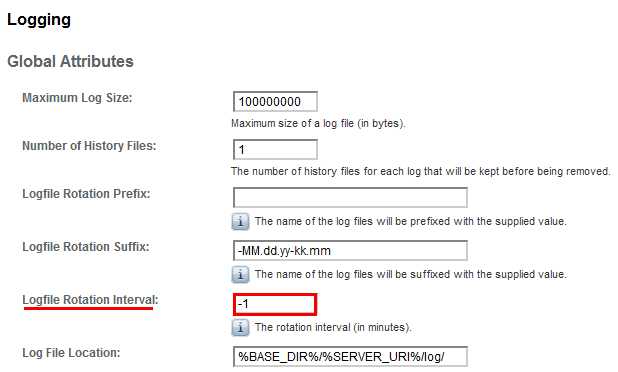
Previously, the log files in %BASE_DIR%/%SERVER_URI%/log/ are accumulated. And they can get really huge if no proper housekeeping is in place.

So the enhancement in this release is to implement log rotation (-1 implies no rotation).


To turn on log rotation, key in a value greater than -1 (1440 in minutes == 1 day). There is no need to restart OpenAM server.


Nice! The logs are now rotated every day.


However, the nightmare remains.... the logs in debug and stats directories remain unrotated. The next improvement should be the log files in these 2 directories. For the time being, nightly cron is still a must! :)


Updated on 21th Jun 2012

I was wrong about saying logs in debug directory remain unrotated. See OPENAM-41. It's there, but super not obvious only.

.


How to customize OpenAM Login Page?

The chapter Customizing the OpenAM End User Pages in the latest OpenAM 10.0.0 documentation has the steps to re-brand the OpenAM Login Page.


The most important statement in the document is "where suffix is the value of the RDN of the configuration suffix, such as opensso if you use the default configuration suffix dc=opensso,dc=java,dc=net" in Step 2.

This is where past document and/or wiki did not do a good job and thus caused confusion. Honestly, I could not make the customization to work until this latest document is released.

By following the instruction, I quickly located my configuration suffix, which is azlabs.sg (take note not to  confuse with user data store suffix).


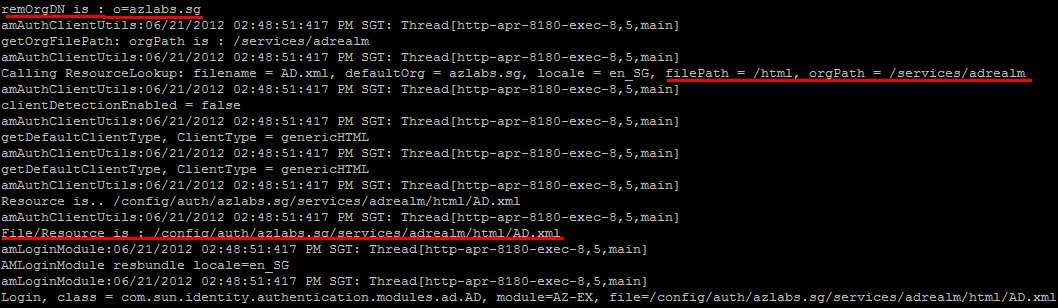
Then I was about to create the required directory, which is /path/to/tomcat/webapps/openam/config/auth/azlabs.sg/html.


It works!


Updated on 21th Jun 2012:

The following information is captured in Authentication log if you turn debug log to MESSAGE.


.


Wednesday, June 6, 2012

Account Lockout feature in OpenAM

I'm still playing with the latest OpenAM 10.0.0 in preparation of a upcoming overseas project.

I came across the Account Lockout feature in OpenAM.  

Go Access Control > / (Top Level Realm) > Authentication > All Core Settings ...


Scroll down a little and you'll see the Account Lockout section...


Note that this functionality is in addition to any account lockout behavior implemented by the LDAP Directory Server.

There has been questions asked many times regarding this feature. Many customers thought they can use this OpenAM UI to configure the setting in their backend directory server (Sun DS, OpenDJ or even AD).

This is totally wrong assumption. OpenAM is not capable of and should not even be capable of managing the backend directory server. It only provides a generic authentication mechanism to authenticate with any backend directory server.

.


Thursday, May 31, 2012

AUTHENTICATION-268

I was playing with OpenAM 10.0.0 and was trying to connect my OpenAM to our Active Directory using the Active Directory Authentication Module.

But, I kept getting "An internal authentication error has occurred" message.


So I went ahead to check amAuthentication.error ...

"2012-05-31 22:11:30" "Login Failed|module_instance|AZ-AD" cheechong "Not Available" 192.168.5.6 INFO o=azlabs.sg "cn=dsameuser,ou=DSAME Users,o=azlabs.sg" AUTHENTICATION-268 AZ-AD "Not Available" 192.168.5.6

What's that? A google linked me to Oracle's website. It's a "Module based authentication failed" error. I have mis-configured the hostname of my AD! :)

This error message codes are precious. I have converted the HTML page to a PDF here for safe-keeping. Just in case, no harm. :)

.

OpenAM 10.0.0 new look and feel

OpenAM 10 now has a new look and feel.


It's cool!


Monday, May 21, 2012

Role of a Software Architecture

I came across the following diagram while working on a tender. Pretty illustrative of what is expected from a Software Architecure. 

.

Tuesday, May 1, 2012

OpenAM Policy Agent 3.0.5 - weird naming service validation error

I was trying to resolve an issue with OpenAM Policy Agent for one of our customers. There seems to be a bug with PA 3.0.4 such that it could not set cookie on server request.

Apparently, PA 3.0.5 seems to resolve this bug. So I went ahead to download and install PA 3.0.5.

Every time I tried starting Apache, it will crash, logging the following error:


[Tue May 01 14:01:42 2012] [crit] Failed to initialize policy web agent
Configuration Failed

The amAgent debug log showed:

2012-05-01 14:01:42.168   Error 13395:152d1a0 all: URL [https://idp.azlabs.sg:8080/am/namingservice] validation failed with error [-1]

On OpenAM Server side, there was error in Authentication debug log:


amAuth:05/01/2012 02:01:42:044 PM SGT: Thread[http-apr-8080-exec-9,5,main]
LOGINFAILED Error....
amAuth:05/01/2012 02:01:42:044 PM SGT: Thread[http-apr-8080-exec-9,5,main]
Exception : 
com.sun.identity.authentication.spi.AuthLoginException(1):null
com.sun.identity.authentication.spi.AuthLoginException(2):Unknown LDAP exception.
com.sun.identity.authentication.modules.ldap.LDAPUtilException(3):User not found.
com.sun.identity.authentication.modules.ldap.LDAPUtilException: User not found.
at com.sun.identity.authentication.modules.ldap.LDAP.processLoginScreen(LDAP.java:823)
at com.sun.identity.authentication.modules.ldap.LDAP.process(LDAP.java:554)
at com.sun.identity.authentication.spi.AMLoginModule.wrapProcess(AMLoginModule.java:998)
at com.sun.identity.authentication.spi.AMLoginModule.login(AMLoginModule.java:1168)
at sun.reflect.GeneratedMethodAccessor44.invoke(Unknown Source)


Very strange... With the same OpenAM setup, there was no problem starting PA 3.0.4.

After much investigation, I realized it's the Authentication Module Instance that is causing the issue. In our default "ldapService" authentication chaining, we have changed to LDAP, instead of the default DataStore.


When I switched back to DataStore, the PA 3.0.5 started working!


2012-05-01 14:16:44.571      -1 13913:232b1a0 all: URL [https://idp.azlabs.sg:8080/am/namingservice] validation succeeded


There must be some code change to how the PA authenticates with OpenAM in version 3.0.5.


Updated on 23rd June 2012

There was indeed a bug with PA 3.0.5 back then. I have since raised a ticket and the issue was resolved. The nightly build should have resolved this issue.

.